

Isograph Alternative: AI That Builds the FMECA and Maintenance Strategy From Your Own Data
Isograph is the reliability toolset many asset-heavy teams grew up on: Reliability Workbench for FMECA and fault trees, Availability Workbench for RCM, Weibull and life cycle cost. Since joining PeakAvenue it sits next to APIS IQ and PLATO e1ns. The models are strong. Building the FMECA is still manual work.
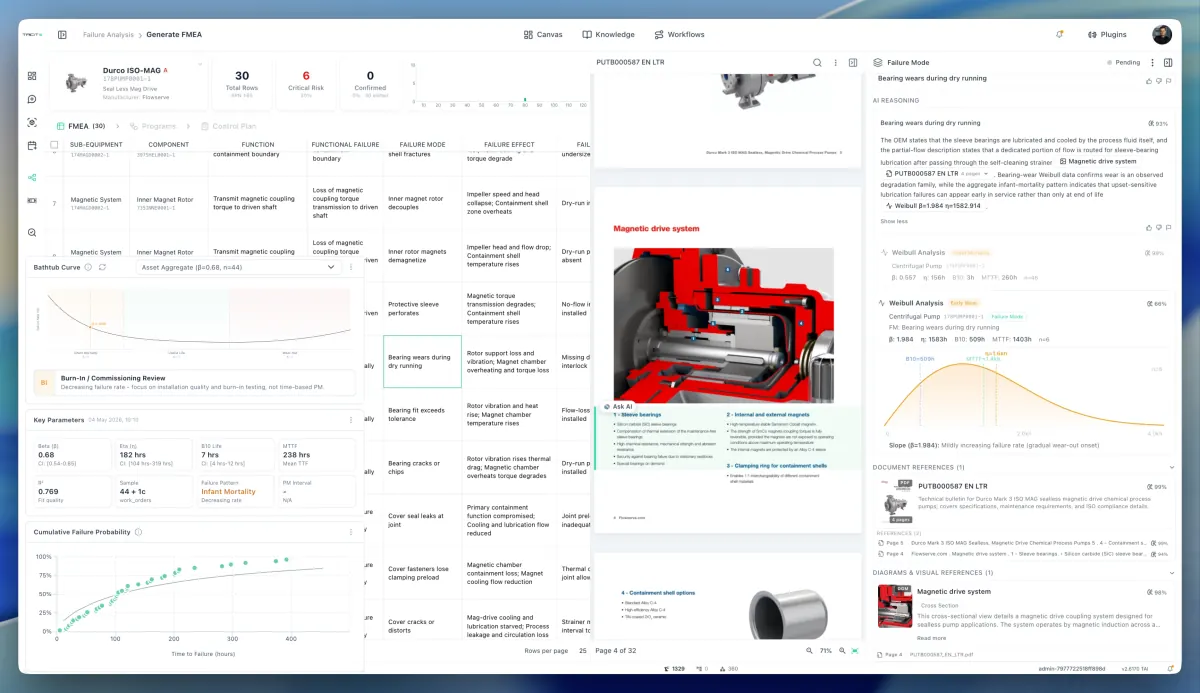
Tacit AI builds the FMECA and the maintenance strategy from your own manuals, P&IDs, BOMs and work orders, every row traced to its source, with tasks, work instructions, PRTs and PMIs ready for your CMMS. Your engineers review and approve. It is used by global engineering teams in automotive, pharma, steel and mining.
The short version
- Isograph is strong on analysis: FMECA to MIL-STD-1629A, fault trees, Weibull from SAP or Maximo history, and plans uploaded to SAP.
- No Isograph page names AI. Tacit AI builds the FMECA and the RCM strategy from your documents and work orders.
- A global mining operator built its crusher FMECA 8.4x faster and cut unscheduled crusher downtime 21.3%.
- Keep Isograph for fault trees and simulation. Your FMECAs come in from it.
What Isograph Does Well
- FMECA standards. MIL-STD-1629A, BS 5760 Part 5, AIAG & VDA, SAE J1739 and ARP5580, with failure mode and phrase libraries (Isograph FMECA).
- Linked safety analysis. FMECA rows link directly to fault trees, RBDs and hazard logs.
- CMMS history. Availability Workbench connects to SAP or Maximo and builds failure models with Weibull analysis (Availability Workbench).
- Plans into SAP. Historical failure data comes down into Weibull sets, and maintenance plans go up to SAP (RCM SAP interface).
Where the Work Still Sits
Weibull from failure dates tells you how often an asset fails. It does not write the FMECA. Someone still reads the OEM manuals, walks the P&IDs, sorts free-text work orders into failure modes and types each row. On a full crusher circuit or a fill-finish line, that is months of a reliability engineer’s time.
Tacit AI does that reading:
- Manuals and drawings in. Functions, failure modes, causes and effects come from the OEM manuals, P&IDs and BOMs, plant to component.
- Work orders made usable. Every work order is scored, structured and linked to its failure mode, and bad actors are ranked.
- Strategy out. RCM to SAE JA1011, tasks and work instructions, with PRTs and PMIs per task.
Isograph vs Tacit AI
| Isograph | Tacit AI | |
|---|---|---|
| Who writes the FMECA | Your engineers, with phrase libraries | Tacit AI builds it, engineers approve |
| AI | Not published | Builds the FMECA and RCM strategy |
| Source per row | Not published | Every row traced to its source |
| Work orders | Failure data for Weibull | Free text linked to failure modes, ratings flagged |
| Maintenance outputs | Plans uploaded to SAP | Tasks, work instructions, PRTs, PMIs, CMMS exports |
| Fault trees, RBD, simulation | In the toolset | Keep them in Isograph |
| Deployment | Desktop or client-server | Cloud or on-premises, in the browser |
| Time to first FMECA | Not published | Days. Setup in hours |
How Tacit AI Builds the FMECA
- Connect. Manuals, P&IDs, BOMs and work orders from SAP PM, Maximo, IFS or any CMMS. Existing FMECAs come in from Isograph as files. Setup in hours.
- Build. The FMECA plant to component, criticality ranked, every row traced to its source. The first one arrives in days, 80-90% engineer-ready on first delivery.
- Approve. Engineers review each row and task, and every decision is recorded.
- Export and keep up to date. Tasks, PRTs and PMIs export in your CMMS’s field names, ready for SAP or Maximo. New work orders flag the rows and tasks they change.
ArcelorMittal runs 43-minute workflows in under 1 with Tacit AI, and a Top 10 Global Pharma cut unplanned downtime 15.3% on 1 critical fill-finish station.
Keep Isograph for What It Does Best
- Fault trees, RBDs and availability simulation stay in Isograph.
- Your FMECAs come in from Isograph as files.
- Maintenance tasks export in your CMMS’s field names, and approved FMECA changes export to Excel.
Reviewing your maintenance strategy?
Get the PM review sheet to test every task against the failure mode it prevents.
We email you the PDF. No newsletter. Privacy policy
Other Alternatives
Each comparison uses only the vendor’s own pages:
- ReliaSoft XFMEA alternative
- Windchill FMEA alternative
- Relyence FMEA alternative
- Best RCM and FMECA software, 8 tools compared
Bring the manuals and a year of work orders for 1 critical asset. Book a working session and see its FMECA and maintenance strategy built from them.
Frequently Asked Questions
Is there an AI alternative to Isograph?
Yes. Tacit AI builds the FMECA and the RCM strategy from your own manuals, P&IDs, BOMs and work orders, every row traced to its source. It works next to Isograph, so fault trees and simulation stay where they are.
Does Isograph have AI?
No Isograph page names AI. Availability Workbench builds Weibull failure models from SAP or Maximo history. Tacit AI builds the FMECA itself from your documents and work orders.
Is Isograph part of PeakAvenue?
Yes. Isograph is a PeakAvenue company, next to APIS IQ and PLATO e1ns. See the APIS IQ alternative.
Can Tacit AI send maintenance tasks to SAP or Maximo?
Yes. Tasks, PRTs and PMIs export in your CMMS’s field names, ready to load. Connectors to SAP PM and Maximo read work orders read-only.
How fast is the first FMECA?
Setup takes hours. The first FMECA is built in days, 80-90% engineer-ready on first delivery. A full crusher circuit FMECA and RCM took 3 weeks, not months.
Sources
- FMECA software, Isograph
- Availability Workbench, Isograph
- RCM SAP interface, Isograph