Design FMEA (DFMEA) software. Your DFMEA learns from the field.


Controls built into the Design FMEA workflow

Source-linked
evidence on every row
Approval workflow
Row-level
approve, revise, or reject
Engineers hold sign-off
Change-aware
affected rows flagged instantly
No autonomous release
Requirements → risk
cross-function traceability
Evidence graph
AIAG-VDA
7-step structure, built in
Audit-ready output

The Gap

The DFMEA is approved. The evidence keeps changing.

Tests, engineering changes, supplier records and field events invalidate assumptions long after the review meeting ends.

Left disconnected, stale assumptions get signed off and the gaps show up after release.


01
“500 components - how do I map them all?”

Map the BOM before the DFMEA review.

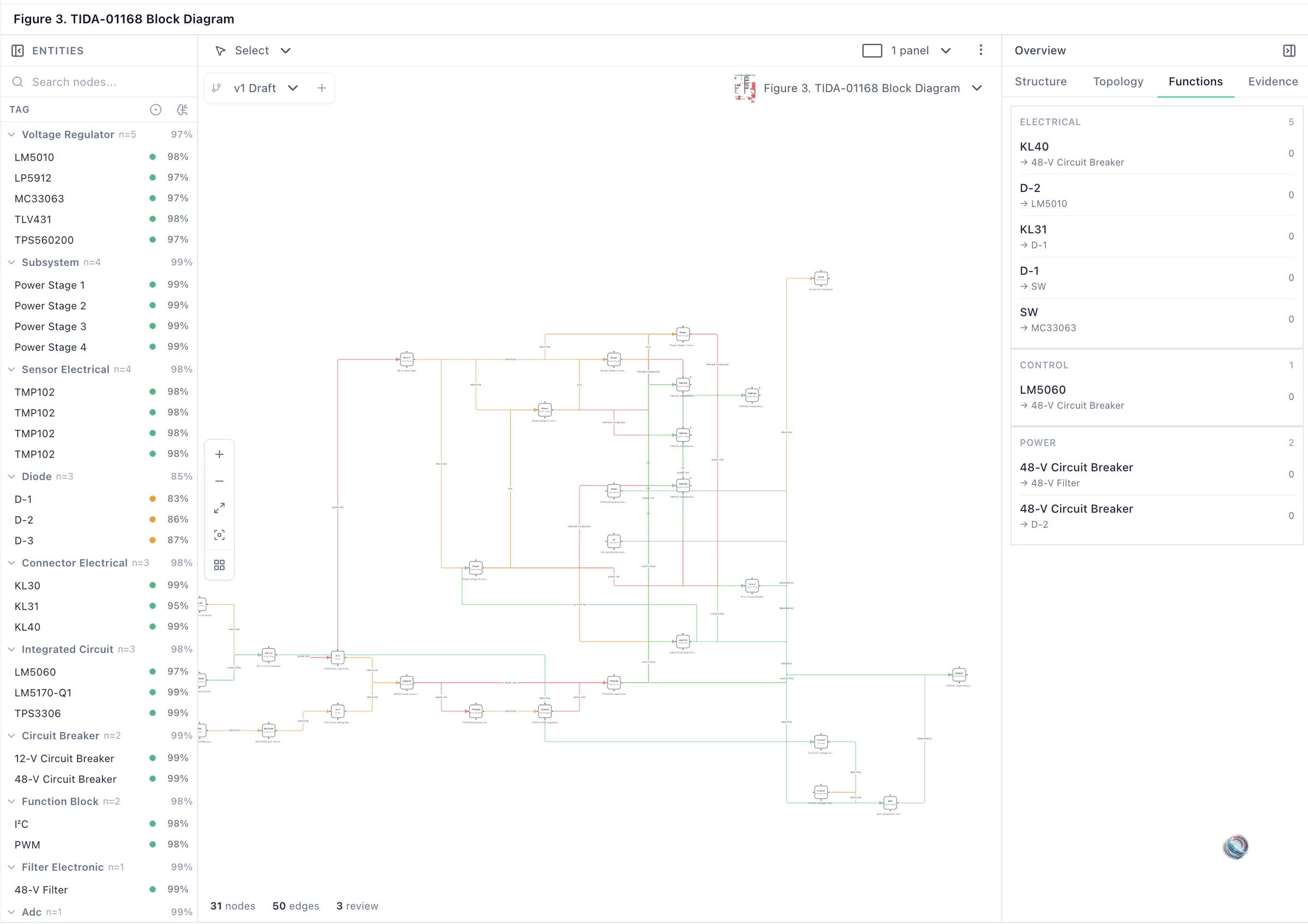
Sync structures from Teamcenter, Windchill and 3DEXPERIENCE. Supplier FMEAs are checked against your hierarchy for coverage gaps, and every row keeps its source.
BOM Import
SC/CC/HIC Classification
Requirements Traceability
Supplier FMEA Matching

Product hierarchy with BOM import and requirements traceability

02
“What can fail, and what flows downstream?”

Carry design risk into process controls.

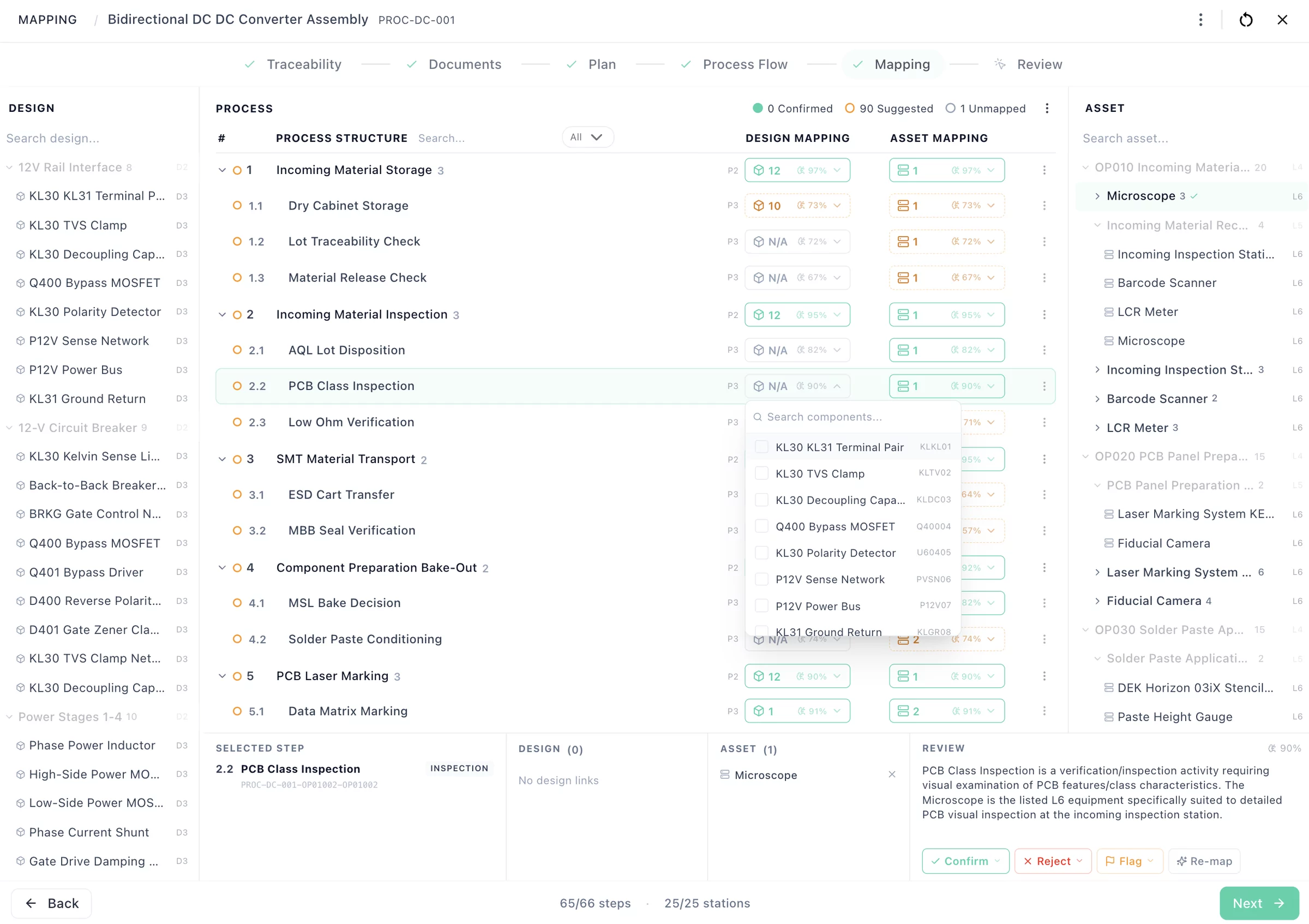
Severity and special characteristics flow into PFMEA and control-plan review. AIAG-VDA Action Priority or legacy RPN, your choice.
DFMEA & SFMEA
DFMEA → PFMEA → Control Plan
FMEA Verification
AIAG-VDA Native

Design-to-process-to-asset mapping with component traceability and confirmation workflow

03
“Update severity to 8 for all thermal failure modes.”

Say it or type it. Approve every change.

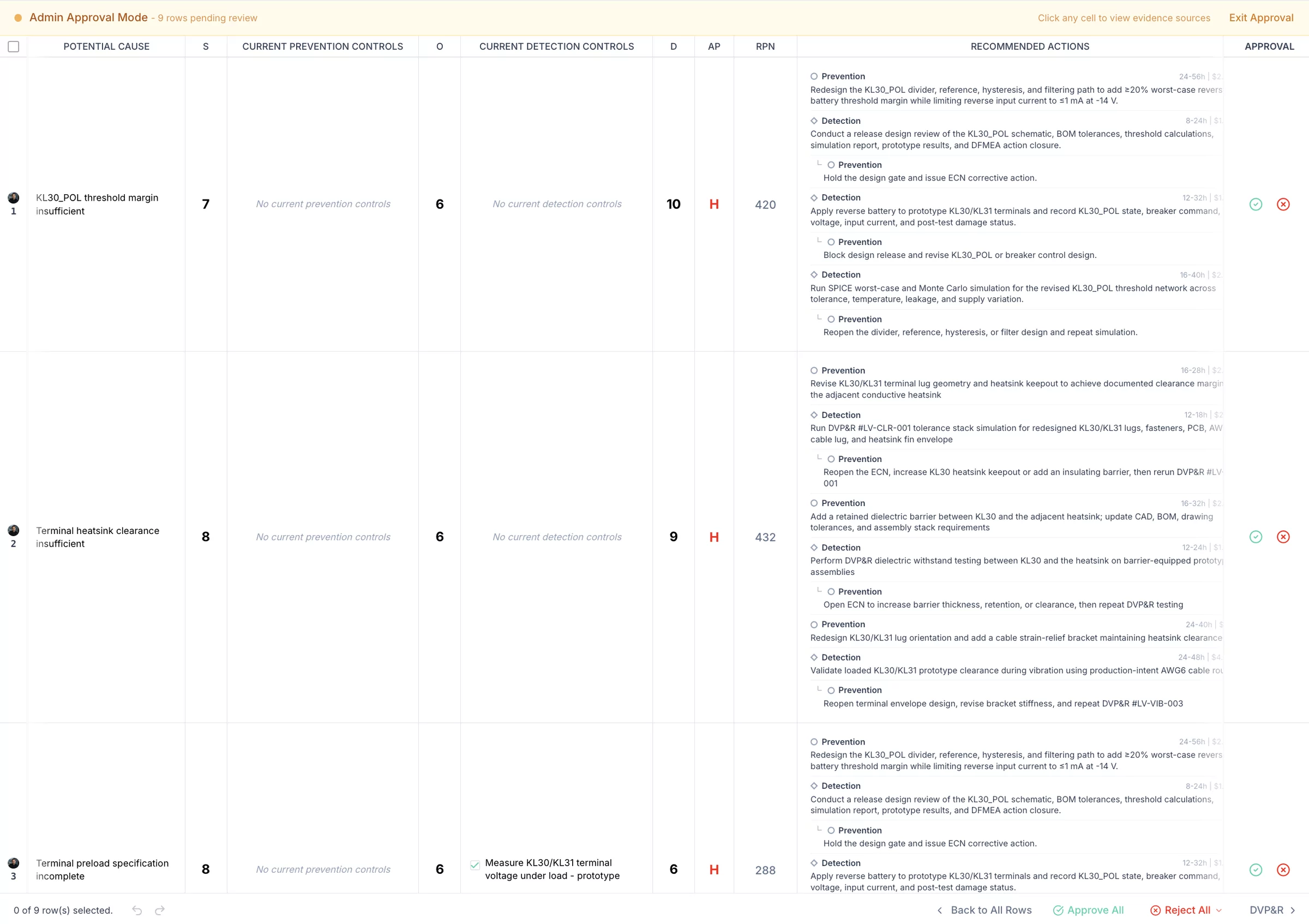
Dictate a change or type it. Every edit shows its evidence. Approve row by row. Nothing enters the FMEA without your sign-off.
Voice Commands
Per-Row Approve/Reject
Cited Answers
40+ Languages

AI companion with per-row approve and reject workflow

04
“How does my DFMEA connect to PFMEA and control plan?”

Design, process and asset on one canvas.

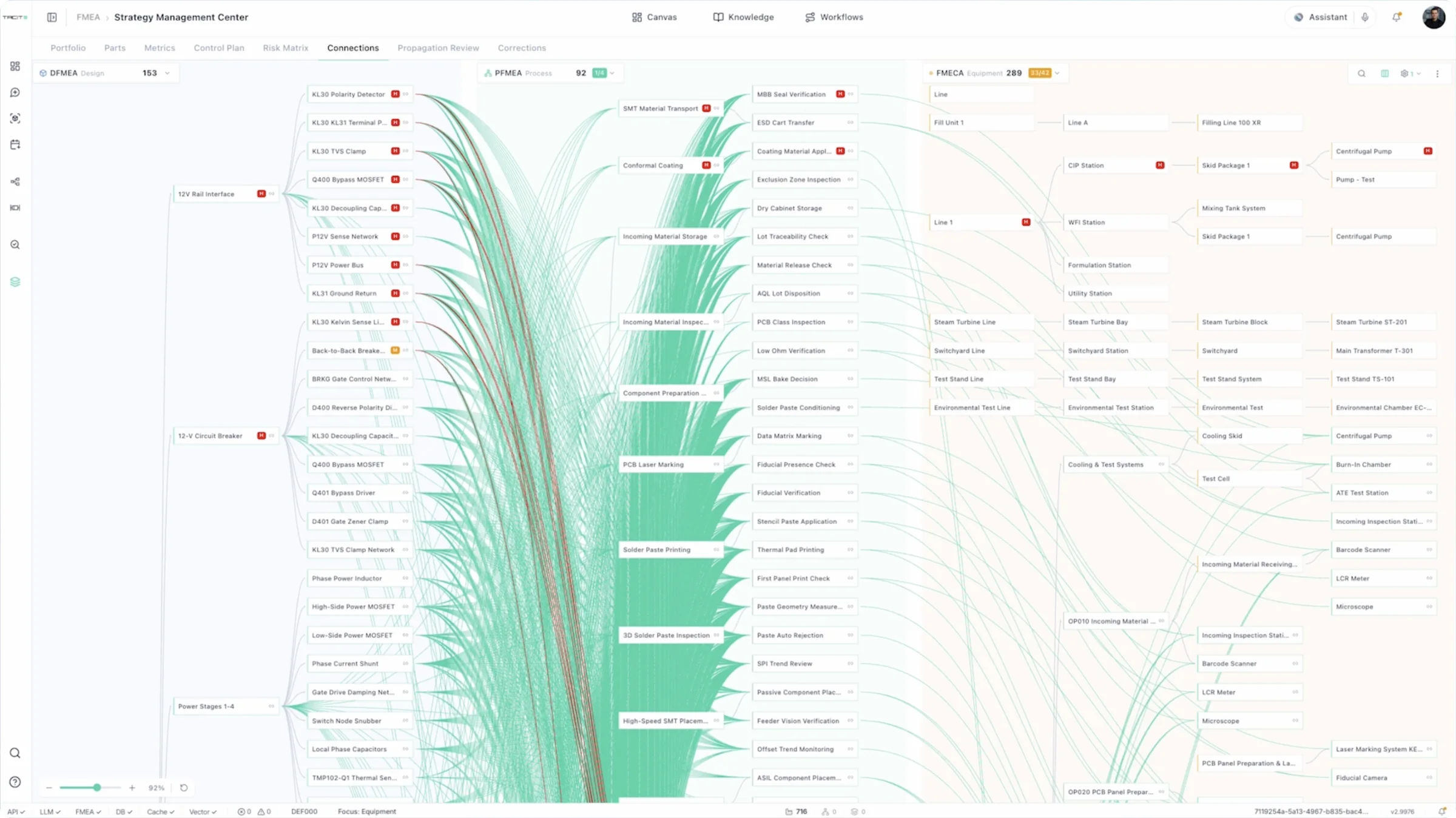
Click any link for its evidence. A design change flags every PFMEA and control-plan row it touches.
DFMEA → PFMEA → CP
Visual Connections
Change Propagation
Regression Detection

Connections canvas: design, process and asset risk linked on one canvas

05
“We use the same steering column in 3 platforms. Do I update each one?”

Build once. Reuse with every difference visible.

Reuse approved component content on every product. Family View shows the differences, and each owner confirms.
Component Library
Template Auto-Build
Variant Control
Family Delta View

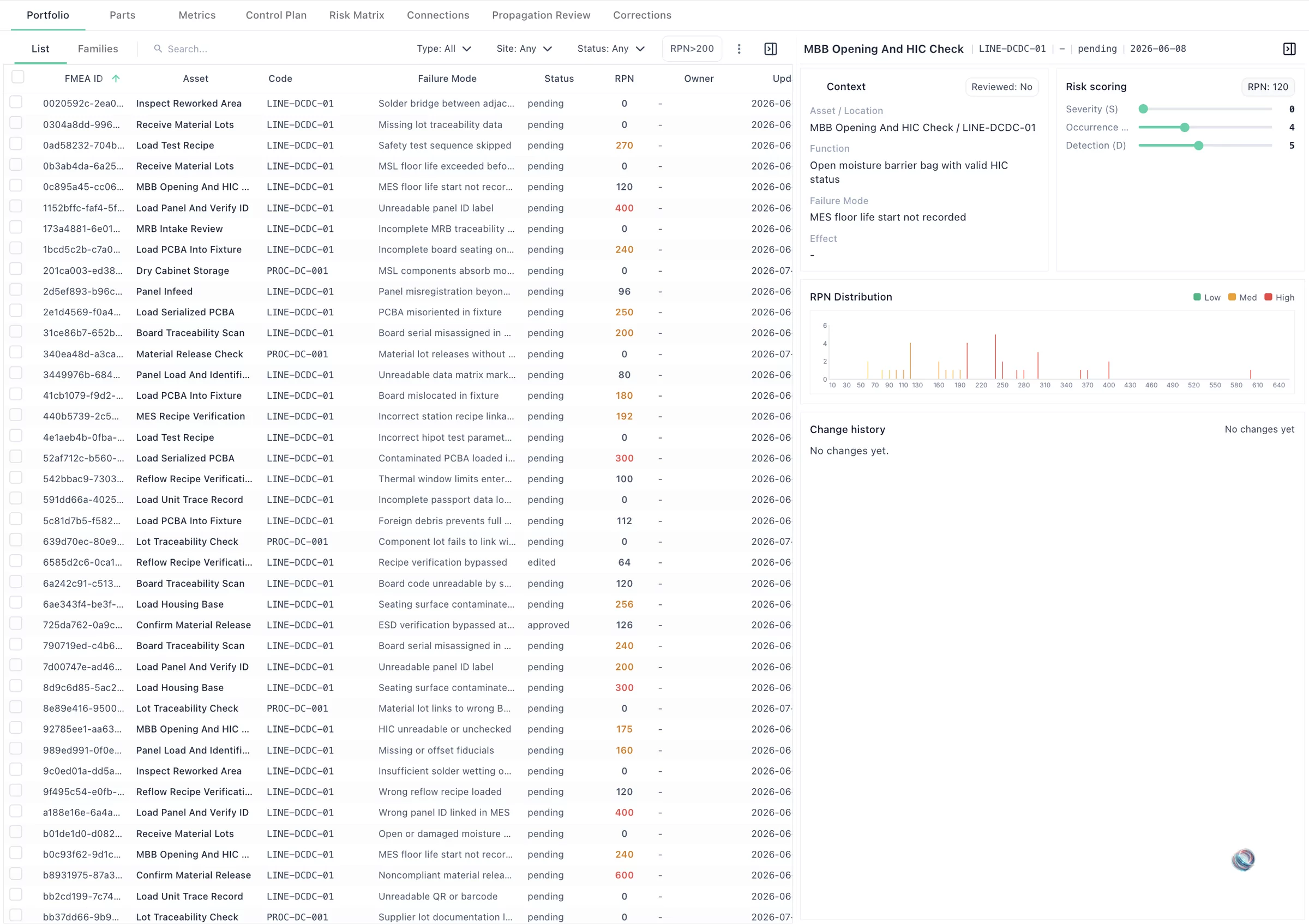
Component template library with FMEA portfolio, families, and propagation view


What You Get

See the design risks your current analysis doesn’t cover.

DFMEA

Engineer-Ready DFMEA

80-90% draft-ready on first delivery, AIAG-VDA with AP and RPN. Every row traced to source.

SFMEA

SFMEA with Interface Mapping

System-level failure modes across every subsystem interface.

DVP&R

DVP&R with Kanban Tracking

Every DFMEA row linked to its tests, with coverage and pass/fail per component.

SC/CC

SC/CC Across the Chain

SC/CC/HIC carried from DFMEA into PFMEA and control plan, with owner approval.

Diagrams

Boundary and Interface Diagrams

Boundaries, interfaces and flows drawn from your BOM and specs.

Nets

Cause-Effect Chains

Function, failure and cause-effect chains across components. AIAG-VDA Steps 3-4, done early.

Review

Design Review Package

Top risks by AP, open actions and DVP&R coverage, ready for the APQP gate.

Source

Full Source Traceability

Every row linked to its spec paragraph. Spec changes flag the rows they touch.

Supplier

Supplier DFMEA Validation

Supplier DFMEAs checked against your design. Gaps flagged before sign-off.

Pass your engineers’ review → scale site-wide.

Maturity model

Meet your team where they are.

From no risk strategy to a living FMEA that feeds design, verification and field.

L0
Reactive
No structured risk strategy. FMEAs don’t exist or are checkbox exercises.

Data Quality
FMEA / FMECA
Dynamic Updates
Taxonomies
Optimization

L1
Basic
Static FMEAs in spreadsheets, rarely updated. Tribal knowledge, lost when people leave.

Data Quality
FMEA / FMECA
Dynamic Updates
Taxonomies
Optimization

L2
Connected
Specs, tests and field evidence build a full, source-linked DFMEA.

Data Quality
FMEA / FMECA
Dynamic Updates
Taxonomies
Optimization

L3
Dynamic
New evidence flags every affected row. Owners approve before anything changes.

Data Quality
FMEA / FMECA
Dynamic Updates
Taxonomies
Optimization

L4
Closed-Loop
Design, process and field in one governed loop with full history.

Data Quality
FMEA / FMECA
Dynamic Updates
Taxonomies
Optimization

Questions

Design FMEA questions, answered.

Natively. Tacit AI covers the AIAG-VDA 7-step method end to end, from planning and structure through function, failure, risk and optimization. It builds the hierarchy and rows in your format. Your cross-functional team sets scope, ratings and actions and signs off.

Both. Tacit AI reads BOM and CAD metadata from your PLM or its exports, alongside specifications, requirements, design reviews and test reports. Geometry interpretation is scoped to your CAD format and integration. Missing context is flagged, so engineers always know what the evidence proves.

Every failure mode keeps its links to the functions, requirements and source passages behind it. A requirement revision flags every DFMEA row it touches. Engineers trace any row back to its source and record the final disposition.

Keep them. Your template and PLM stay the system of record. Tacit AI delivers source-linked content in your template and exports or integrates it through your mappings, validation and change control.

The connection model links subsystem interfaces, inputs, outputs and requirements. Tacit AI identifies interface failure modes with their evidence and assumptions. A subsystem change flags every interface row it affects.

Yes. Dictate in the chat in 40+ languages, or talk to the live voice agent. Tacit AI turns what you say into cell-level DFMEA changes, each with its reasoning and source. Your engineers approve, edit or reject every row, and approved changes export to Excel for APIS IQ and PLATO. Attach workshop notes or a meeting transcript and you get the same reviewable changes.

No. Every output carries source citations and needs engineer sign-off. Tacit AI builds the full DFMEA from your specs. Your engineers review and approve it, and spend their time on design decisions instead of filling spreadsheet rows. Every correction makes the next one better.


Bring one subsystem.
See the risks your current DFMEA doesn’t cover.

Your engineers judge the output. 30 minutes.

“We evaluated Tacit AI for Design FMEA on a critical subsystem. The structured output and the approach to connecting information exceeded expectations.”


Design Engineer, Top 10 Global OEM, DFMEA, Europe
Cookie settings
Necessary cookies keep the site working and are always on. Analytics and advertising cookies are only set if you allow them. You can change this at any time. Privacy policy
Necessary
Allow Necessary cookies.
Analytics
Allow Analytics cookies.
Advertising
Allow Advertising cookies.